How to Scan & Solve Math Problems with Your Phone
You're staring at a problem, it's late, and typing x²+7x−4 into a search box with the right symbols is its own puzzle. There's a faster way: point your camera at the problem. Math Solver reads the equation from the photo — printed or handwritten — and returns the solution with full working in seconds.
How can an app read and solve a photographed problem?
The app combines two layers of AI. First, vision recognition converts the photo into the actual mathematical expression — handling fractions, exponents, roots, and messy handwriting. Then the solver works the problem the way a tutor would, producing each step of the solution rather than a bare answer. That second part is what separates a homework helper from an answer key.
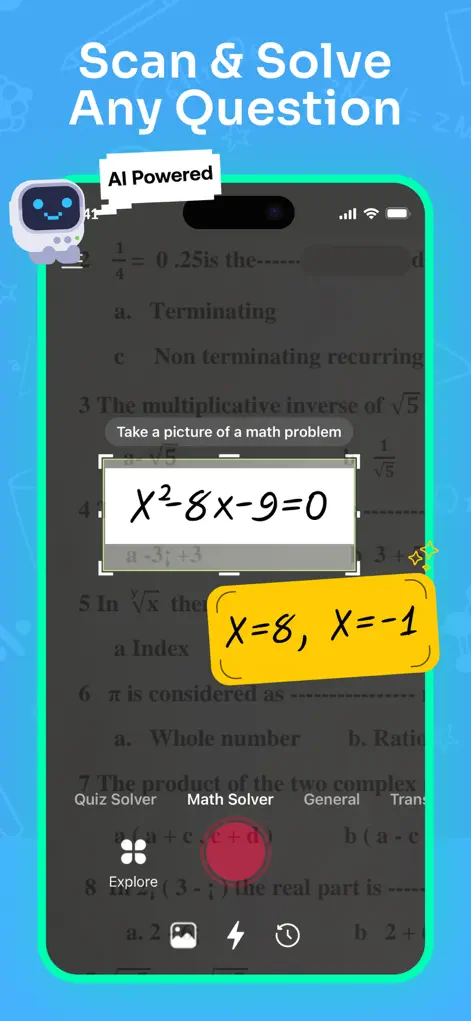
Step-by-Step: How to Scan & Solve Math Problems with Your Phone
- Open Math Solver and tap the scanner. The camera view opens with a crop frame.
- Frame one problem at a time. Fit a single equation or exercise inside the frame — tight cropping avoids picking up neighboring problems.
- Snap and review the recognition. The app shows the equation it read. Confirm it matches the page (or re-scan if the handwriting was ambiguous).
- Read the solution and the steps. You get the answer plus the full worked solution, stage by stage. Ask the AI tutor about any step you don't follow.
Try It on Your Next Assignment
Math Solver: AI Homework Helper is free to download on the App Store. Scan your first problem in seconds.
⬇ Download Math SolverFrequently Asked Questions
Does it work on handwritten math problems?
Yes — the recognition handles legible handwriting as well as printed textbooks and worksheets.
Can it scan word problems too?
Yes, the scanner reads full problem text, not just equations — see the word problem guide for details.
What if the app misreads my problem?
You'll see the recognized equation before solving; re-scan or correct it so the AI solves exactly what's on your page.